Transporter ERP Software with Door Pickup & Delivery – Take Your Transport Business Online
Still Managing Your Transport Business with Registers, Excel and Phone Calls?
Imagine running a transport business where customers can book shipments online, request door pickup, track their goods, download LR receipts and receive delivery updates without repeatedly calling your office.
Now imagine your transport office, warehouse, drivers, booking agents and customers working through one connected software platform.
This is what a modern Transporter ERP Software with Door Pickup and Delivery Management is designed to achieve.
For transporters handling local goods movement, part-load cargo, LTL shipments and intercity transportation, digital operations can help reduce manual work and improve visibility.
Whether you operate between Kanpur and Delhi, Noida and Lucknow, Mumbai and Pune, or manage a larger transport network, the right software can help bring your operations together.
What Is Transporter ERP Software?
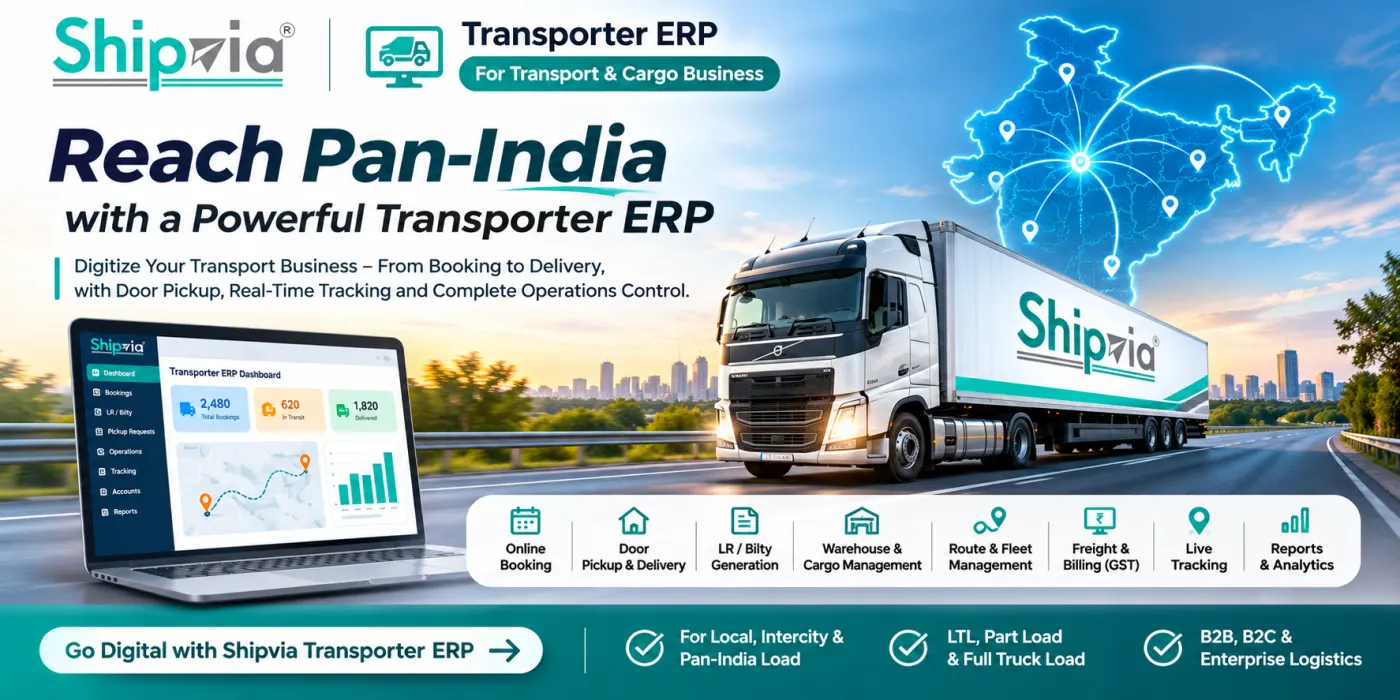
Transporter ERP (Enterprise Resource Planning) software is a centralized system that helps transport companies manage their business operations digitally.
Instead of maintaining separate records for booking, LR generation, warehouse movement, vehicle loading, delivery and accounting, an ERP connects these activities through one platform.
A comprehensive transporter ERP can include:
Online transport booking
Door pickup and door delivery management
LR / Bilty generation
Part-load and LTL cargo management
Warehouse and godown operations
Vehicle loading and route planning
Driver and transporter management
Shipment tracking
Freight calculation and rate management
Customer billing and GST invoices
Payment collection and outstanding reports
Customer, transporter and administrator dashboards
The objective is simple: Make transportation easier to manage for both the transporter and the customer.
1. Online Transport Booking – Let Customers Book Directly
Traditionally, customers call the transport office to enquire about rates, vehicle availability and shipment booking.
With an online transport booking portal, customers can enter their shipment details themselves.
For example, a business wants to transport 1,200 kg of goods from Kanpur to Noida.
The customer enters:
Pickup city and pincode
Delivery city and pincode
Shipment weight
Number of packages
Type of goods
Pickup and delivery requirements
The system can calculate an estimated freight amount using the transporter's configured rate matrix.
The customer can then submit a booking request, and the transport team can review and confirm it.
This reduces repetitive enquiries and creates a digital record for every shipment.
2. Door Pickup Management – Collect Goods from the Customer's Location
One of the most valuable features for a modern transport company is door pickup management.
Customers don't always have the time or resources to deliver their goods to a transporter's godown.
A transporter ERP can allow customers to request pickup directly from their shop, warehouse, factory or office.
How Door Pickup Works
Step 1 – Customer Raises Pickup Request
The customer selects the pickup location, package count, estimated weight and preferred date.
Step 2 – Pickup Request Reaches the Transport Office
The operations team receives the request in its dashboard.
Step 3 – Assign Pickup Vehicle
The dispatcher assigns a driver, vehicle or local pickup partner.
Step 4 – Driver Collects the Shipment
The pickup team verifies package count and records collection details.
Step 5 – Shipment Reaches the Transport Warehouse
The goods are scanned or received at the warehouse, and the shipment status is updated.
Step 6 – LR Generation and Transportation
The system creates or updates the LR/Bilty record, and the goods are prepared for line-haul movement.
Customers can receive pickup confirmation and shipment updates through configured SMS or WhatsApp notifications.
3. Automatic Freight Calculation with Custom Rate Matrix
Different transport companies have different pricing structures.
Some charge per kilogram, others use fixed route rates, minimum freight charges or vehicle-based pricing.
A transporter ERP should allow each company to configure its own freight matrix.
Example Freight Calculation
A transporter operates from Kanpur to Noida with the following sample pricing:
| Particular | Amount |
|---|---|
| Shipment weight | 1,200 kg |
| Freight rate | ₹1.50/kg |
| Base freight | ₹1,800 |
| Pickup charge | ₹350 |
| Door delivery charge | ₹450 |
| Total before GST | ₹2,600 |
Illustrative calculation only. Actual charges depend on transporter rates, routes, weight, taxes and service conditions.
The ERP can calculate applicable GST and other charges based on the configured tax and billing rules.
This helps reduce manual calculations and makes quotations more consistent.
4. LR and Bilty Management Software
LR (Lorry Receipt) or Bilty documentation is a key part of traditional transport operations.
A digital transporter ERP can generate LR records containing:
LR number and booking date
Consignor and consignee details
Origin and destination
Package count and weight
Goods description
Freight and additional charges
Payment terms
Vehicle and transporter details
The LR can be made available as a printable or downloadable document.
Transporters can also maintain separate LR number sequences for branches, business units or service categories.
5. Warehouse and Godown Management
For part-load and LTL transportation, goods often move through multiple warehouses before reaching their destination.
A warehouse management module helps the transport company record exactly where each consignment is stored.
For example:
Kanpur Warehouse → Lane A → Rack 04 → Shipment LR-1025
When warehouse staff scan the shipment, the system can display its storage location and movement history.
Useful warehouse features include:
Inward and outward scanning
Lane and rack allocation
Package count verification
Weight and dimension recording
Loading and unloading records
Shortage and damage reporting
Destination-wise sorting
Warehouse inventory visibility
This can reduce the time spent searching for consignments and improve operational accountability.
6. Vehicle Loading and Route Management
Transporters handling multiple destinations need to plan vehicle loading carefully.
A transporter ERP can support route-based load planning.
For example:
Kanpur → Lucknow → Ayodhya → Gorakhpur
The operations team can see which shipments are assigned to the route, their combined weight and the vehicle's available capacity.
The system can help manage:
Vehicle capacity
Route assignments
Trip sheets and manifests
Driver allocation
Loading and unloading scans
Vehicle departure and arrival records
Trip expenses
Where GPS devices or driver-app location permissions are available, live vehicle tracking can also be integrated.
7. Customer Portal with Live Shipment Tracking
Customers should not need to call the transport office every time they want a delivery update.
A customer portal can provide access to:
Booked → Picked Up → At Origin Warehouse → In Transit → At Destination Warehouse → Out for Delivery → Delivered
Customers can also view LR details, download invoices, request pickup and raise support tickets.
This creates a more transparent transport experience.
8. Door Delivery and Last-Mile Management
Transportation doesn't always end when goods reach the destination godown.
Some customers prefer self-collection, while others need doorstep delivery.
A transporter ERP can support both options.
For door delivery, the system can assign the shipment to a local delivery vehicle, record delivery attempts and capture proof of delivery.
Features can include:
Delivery assignment
Receiver contact details
OTP or signature-based delivery confirmation
Delivery photographs
Failed delivery reasons
Reattempt management
Digital proof of delivery
This helps transporters manage the final stage of the shipment more efficiently.
9. Transporter Accounting, GST Billing and Outstanding Management
A transport company may handle hundreds of consignments every day.
Managing freight collection, credit customers, invoices and outstanding payments manually can become difficult.
An integrated ERP can maintain:
Paid and to-pay freight records
Customer credit accounts
GST invoices
Branch-wise revenue
Transporter payables
Driver trip expenses
Customer outstanding balances
Payment receipts
Daily and monthly reports
GST treatment should follow the applicable transport service classification and tax rules.
10. Separate Panels for Admin, Customer, Transporter and Driver
A modern transporter ERP should provide role-based access rather than showing every feature to every user.
Admin Panel
Manage branches, staff permissions, rates, bookings, vehicles, warehouses, accounts and reports.
Customer Panel
Create shipments, request pickup, track cargo, download documents and manage payments.
Transporter Panel
Manage assigned loads, vehicles, drivers, trips and delivery updates.
Driver App
View assigned pickups and deliveries, update shipment status, capture proof of pickup and delivery, and report exceptions.
11. Can Small Transport Companies Use ERP Software?
Yes. Digital transport management is not limited to large logistics companies.
A local transporter operating two or three regular routes can start with basic booking, LR generation, pickup requests and customer tracking.
As the business grows, additional modules such as warehouse management, vehicle tracking, billing automation and branch management can be introduced.
The important factor is choosing software that matches the transporter's operating model.
12. Why Door Pickup Can Help Transporters Grow
Traditional transport businesses often depend heavily on customers bringing goods to their warehouses.
Offering door pickup creates an additional service option.
It can help transporters:
Serve customers who cannot arrange their own transportation to the godown
Receive booking enquiries online
Build relationships with e-commerce and B2B clients
Offer pickup and delivery as additional services
Manage recurring business shipments
Expand service coverage through local pickup partners
Door pickup is not simply an additional feature. When supported by efficient operations, it can become an important part of a transport company's growth strategy.
13. Build a Digital Transport Business with Shipvia
Shipvia is developing technology-led logistics workflows covering domestic courier, cargo, LTL transportation, shipment management and customer-facing booking experiences.
For transport businesses exploring digital transformation, the key areas include:
Online customer booking
Custom freight rate matrices
Door pickup and delivery workflows
LR and shipping document management
Warehouse operations
Shipment tracking
Transporter and driver management
Billing and reporting
Role-based dashboards
Specific ERP modules, custom deployments and integrations should be discussed and confirmed before implementation.
Ready to Take Your Transport Business Online?
Whether you operate a local transport service, an intercity cargo network or a growing LTL business, moving your booking and operational processes online can create new opportunities.
Explore Digital Logistics Solutions with Shipvia
Contact: +91 8090212794
Shipvia – Connecting India Through Reliable Logistics.
Frequently Asked Questions
What is the best ERP software for transport companies?
The best software depends on your business model, route network, warehouse operations, billing requirements and budget. Look for configurable rates, LR management, pickup scheduling, tracking and accounting features.
Can transporter ERP software manage door pickup?
Yes. A transporter ERP can include pickup requests, vehicle assignment, driver updates, package verification and pickup confirmation.
Can I generate LR and Bilty online?
Yes. A properly configured transport management system can generate digital LR/Bilty documents with unique numbers and shipment details.
Can customers track their transport shipments?
Yes. A customer portal can show shipment movement based on warehouse scans, driver updates and available GPS integrations.
Can transporter ERP software calculate freight automatically?
Yes. Freight can be calculated using configured rates based on weight, route, minimum charges, pickup and delivery fees, and applicable taxes.
Is transporter ERP suitable for LTL cargo businesses?
Yes. LTL operators can benefit from shipment consolidation, warehouse scanning, route planning, vehicle loading, tracking and freight reconciliation.
Can I manage multiple branches using one ERP?
Yes. A multi-branch ERP can centralize bookings, staff access, warehouse operations, accounting and performance reports while maintaining branch-specific controls.
Conclusion
The future of transportation is not just about moving goods from one city to another. It's about giving customers a simpler booking experience and giving transport companies better control over their operations.
A Transporter ERP Software with Door Pickup and Delivery Management can connect customers, warehouses, drivers, vehicles and accounts through a single digital system.
For transport companies planning to expand their services, investing in the right digital workflows can be an important step toward more efficient operations.
Explore Shipvia's logistics solutions and discover how your transport business can move toward digital operations.